
Appearance
Seeing who is still on course
Audience: Timing operators, organisers and commentators who need to know who is still out — whether that is for safety, for the download tent, or for the commentary box.
Who is still out there? gets asked all day, by different people, for different reasons: the start team wants to know the field is flowing, the commentator wants to know who is about to come in, and at the end of the day somebody has to be able to say nobody is left in the forest. Manager answers it in several places, each shaped for one of those jobs.
This page is the map of where to look. The end-of-day procedure — how to work the list down to zero and what to do with each name — is Safety check: accounting for everyone.
Manager says On course in the UI where other systems may say In forest. They mean the same thing.
Pick the one that fits the question
| I want to… | Look at |
|---|---|
| See at a glance how many are still out | The dashboard Competitors tile |
| Work through every name still out | The On course dialog |
| Chase the runners who finished but haven't downloaded | The Pending dialog, the Pending downloads tile, or the Pending downloads screen |
| Work through the people who never went out | The Not started dialog |
| Search, sort or edit the people still out | The competitor list |
| Know which courses still have people on them | The class list |
| Read standings while people are still out | The Results view |
| Show the crowd how many are still out | Spectator, kiosk and arena screens |
| Ask a question in plain language | An AI assistant |
| Prove who came back, not just what Manager believes | Station memory |
The dashboard Competitors tile
The headline number, and where most people start. The Competitors tile on the event dashboard carries the running totals for the race, with a graph of how many people have been on course through the day beneath them.
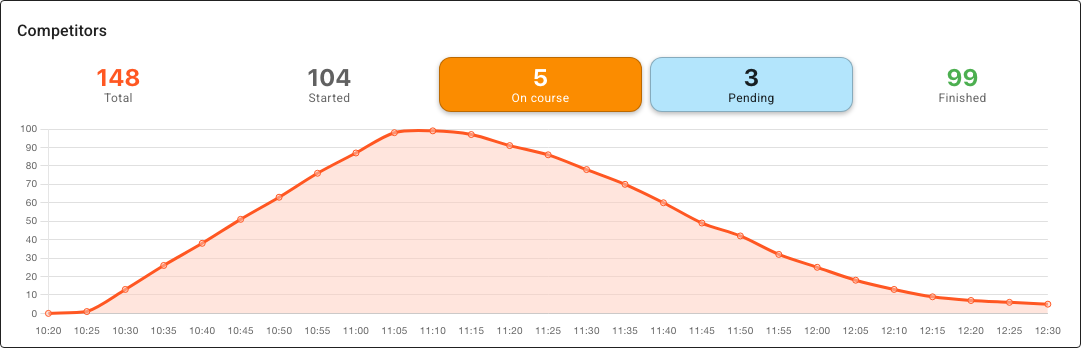
Three of those numbers are buttons: Not started, On course and Pending are drawn as coloured, raised buttons whenever they have anything to show. Click any of them to open the list behind it. (At zero there is nothing to open, so they're drawn like the plain counts around them — no colour, no button.)
- Not started — everyone who has not started. The complement of Started, so the two always add up to Total. It's the one count that gives way on a narrow tile: the counts never wrap to a second line, so once there isn't room to write its label in full, this is the one that goes. Widen the tile to bring it back.
- On course — everyone Manager believes is still out, including anyone who checked in and hasn't come back. This is the safety number, and the one you want at zero at the end of the day.
- Pending — runners who crossed a radio finish but have not downloaded their card. They are back — they just have no confirmed result yet.
The count includes cards no entry accounts for: radio activity from a card, with no finish punch, that nobody entered in the event can still be out on. Somebody is out there, so they are counted. That is a card matching no competitor at all — and also a competitor out on a second course, whose first run has finished and downloaded and so cannot be out on this one. See More than one run on a card.
The On course dialog
Click On course on the tile. This is the single most useful screen for a safety check — everyone still out, on one list.
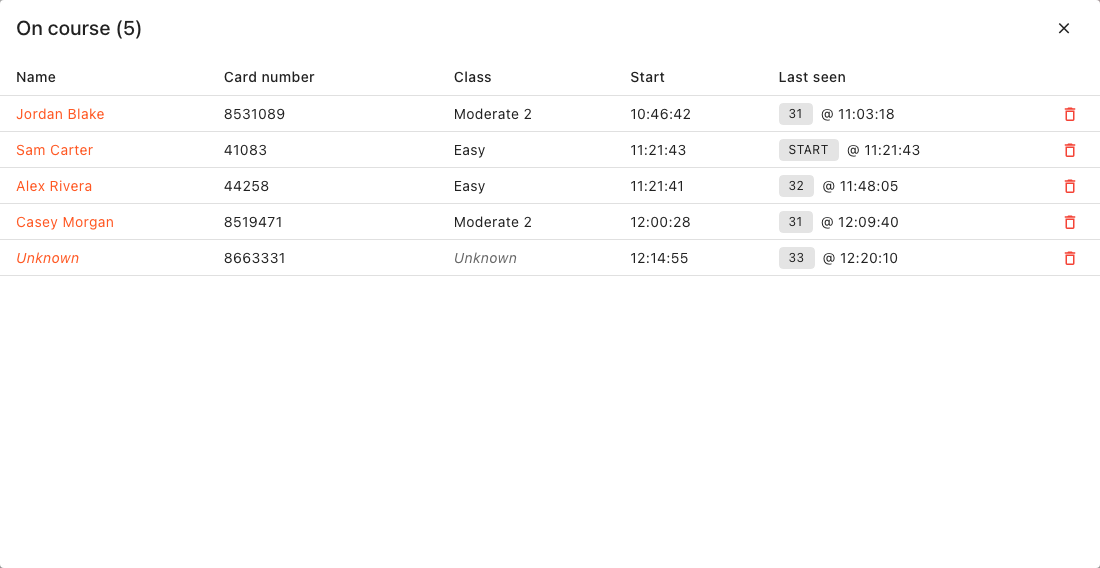
Each row gives you:
- Name — click it to open that competitor. A card no entry accounts for shows in italics: Unknown where nobody in the event carries it, or the runner's name and which run this is (Jordan Blake, run 2) where somebody does. Clicking either offers to register the card as a competitor. A Checked in tag marks a runner who punched the check but has no start — see What the counts include.
- Card number, Class and Start time.
- Elapsed — how long they have been out, counting up every second while the dialog is open. It runs from their start time, so it is what their race time will be if they come in now. Unknown cards count from their start punch; a card first seen at a control, with no start punch behind it, shows
--:--rather than guess. - Last seen — the last thing that saw them and when: a radio control they punched (
31 @ 11:03:18),STARTwhere they have punched nothing since starting, the check they punched over the radio, or the Start station or Check station whose memory you have read. A runner who checked in has been seen, so they always show where.-means nothing has seen them at all. The chip carries the control's code, or the radio's name if you named it.
The list sorts longest-unseen first, so the names that most deserve a look are at the top. That is last seen, not started: in the example above Jordan Blake heads the list on an 11:03 punch at control 31, above three people who started after him but have been seen more recently. Click Elapsed to sort by that instead, shortest time on course first — click again for longest-out first, which is the other way to read the same list when you are asking who has been out too long rather than who has been unseen too long. Every row also carries a delete radio punches action for the rare case where a spurious punch is what is holding a card on the list — see Resolving issues on the day.
--:--means Manager cannot say, not zero. The clock it counts to is the event clock, so Elapsed is blank for everyone once the event is no longer running, and blank for anyone with no start time — a runner whose start Manager never recorded has no elapsed to show, however long they have been out. Their name is still on the list; that is the part that matters for the safety check.
The Pending dialog
Click Pending on the tile. These runners have a radio finish punch and nothing since.
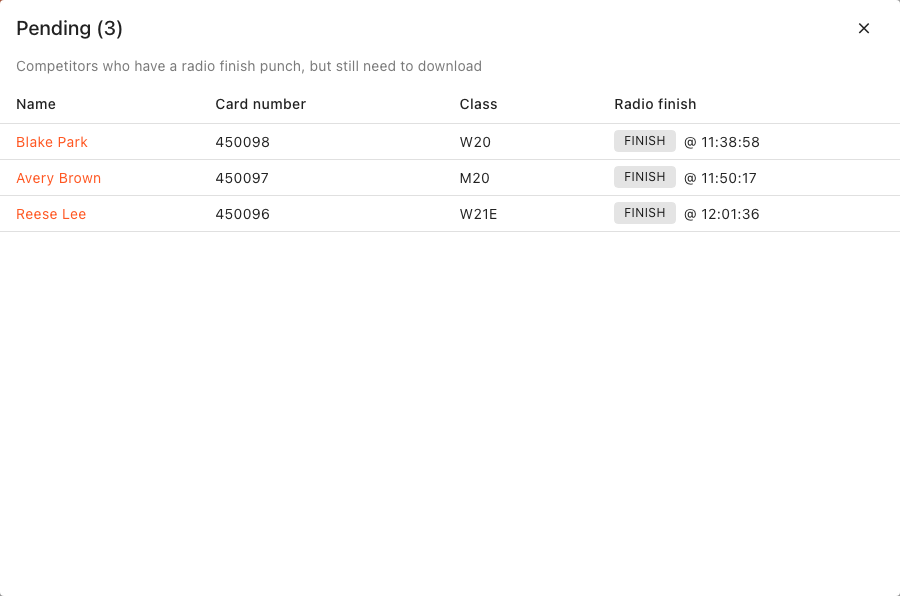
They are not a safety problem — the finish punch is proof they are back — but they are unfinished business: their result is still provisional (OK*) and will never be published as a result until the card is read. This is the list the download tent chases. See provisional OK for what that status does and doesn't mean.
A runner whose card you know won't be read — they've gone home with it, or the card has failed — can be settled from their row: Set DNF or overtime… offers DNF and Overtime. Only a runner with a radio-finish OK has it. It's your ruling, so they leave the list, and if their card does turn up later they stay DNF or Overtime until you click Auto beside the status on the Result tab of Edit competitor. A runner already shown as DNF here got that from the radio — a finish punch with no start time, or the course closure — and is waiting for their card to correct it.
A card nobody is entered on (in italics, with the class Unknown) carries two buttons, because Finish event won't go past it, and apart from downloading the card these are the only ways to take it off the list:
- Enter runner… — the card belongs to somebody who ran. It opens Add competitor with the card number filled in. Once they are entered, their radio finish makes them an ordinary pending runner: download their card, or set them DNF.
- Not a runner… — nobody ran a course with the card: an official trying the finish, a card picked up by mistake. After you confirm, its radio punches are deleted, which can't be undone. On a second run (Jordan Blake, run 2) only that run's punches go; the first run's result is untouched. If they can't be deleted, the list says why above the rows.
An entered runner's row also carries the same delete radio punches action as the On course dialog, for a card that should never have been on the list — a test card punched through the finish. Manager asks before it deletes anything, and a deletion cannot be undone. The runner loses the preliminary result the finish punch gave them.
The Pending downloads tile
The same chase-up list, kept in the corner of your eye rather than opened. Pending downloads is a dashboard tile you switch on yourself (Edit dashboard → Add tile), showing as many names as fit: the time the radio put each of them across the line, their name, and how long they have been waiting since.
Longest wait at the top, so the name that has been owed the longest is the one you see first. Click a row to open that competitor's record — except a card with no entry behind it, which has nobody to open and is drawn as a plain row. Enter somebody against it from the Pending dialog, which offers that.
Cards no entry accounts for are on this list too, by their number (Unknown card 8536559) or by the runner and run (Jordan Blake, run 2). A card the radio saw finish that nobody has read is exactly what this list is for, whether or not there is an entry to put a name to it.
The Not started dialog
Click Not started on the tile. This is the other half of the field: everyone who has not gone out, with their name, card number, class, start time and status. Earliest start time first, so anybody already overdue at the start lane is at the top; anyone with no start time at all sorts to the bottom, because they cannot be overdue.
The list is deliberately wider than "still expected", and the Status column is what tells the two apart:
- No status — nobody has accounted for this person yet. Before their start time they are simply still to come; well after it, they are a no-show you have not cleared.
- DNS, Not competing or Cancelled — the absence has already been dealt with, by you or by a course closure.
Marking a no-show DNS therefore does not change the count — it moves a name from the first group to the second, which is the point: the tile never quietly loses an entry, and Started plus Not started always equals Total. Click a name to open that competitor.
For the end-of-day procedure this feeds, including the bulk Set competitors DNS action, see Marking no-shows as DNS.
The competitor list
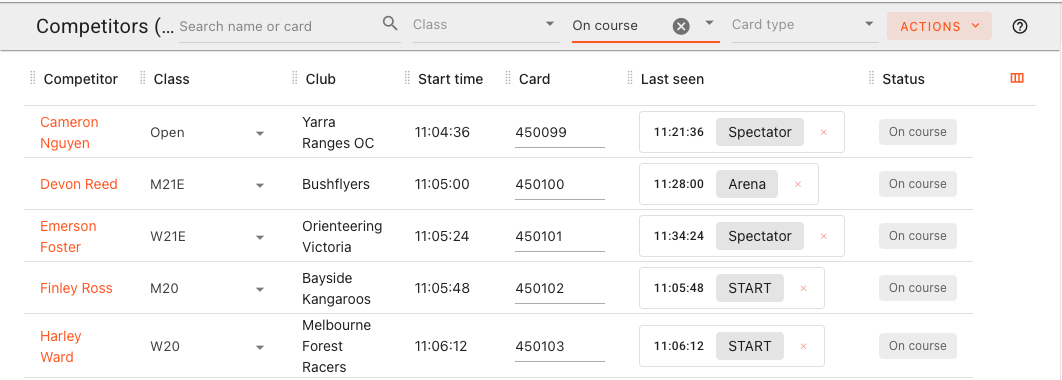
The dialogs are read-mostly; the competitor list is where you can search, sort, filter and edit. Set the Status filter to On course:
Worth knowing:
- The On course option is always in the filter, even before anyone is on course, so you can pre-set it.
- It names the same people the dashboard's On course count counts. So it includes runners who checked in and haven't come back, and Overtime runners nobody has seen come back; and it leaves out relay runners still waiting in the changeover pen who haven't checked in. Where the check-in is the only reason somebody is listed — their status is blank, or they're a relay runner still in the pen — they carry a Checked in tag in the Status column.
- The Last seen column shows what last saw each runner on the list inline — a radio punch, the check included, or a Start or Check station's memory — a fast way to spot the people nobody has seen since the start (the two
STARTrows above). - The same filter offers OK - pending download — the same set as the Pending dialog, but in a list you can act on.
The class list
The Classes page has an On course column: how many are still out, class by class.
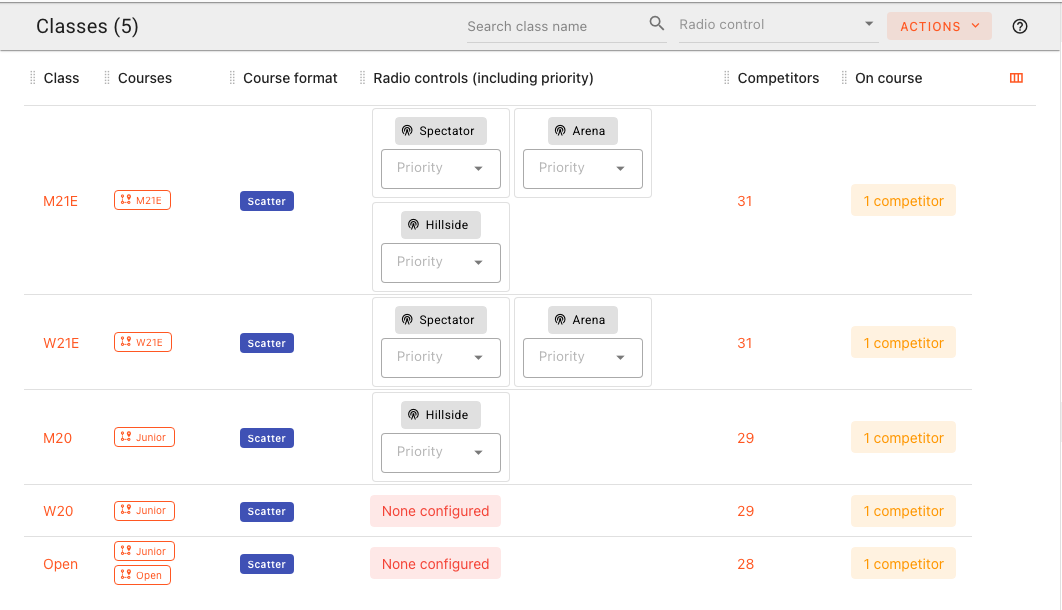
This is the one to use when the question is about the courses rather than the people — most often "can we start collecting controls yet?". A class showing zero has nobody left who could still punch its controls.
Click the count to open the On course dialog for that class alone — the same list, same columns, narrowed to the one class. A class with nobody out shows a green None chip instead, and there is nothing to open.
Note: The per-class list cannot show unknown cards, because an unmatched card belongs to no class. For the safety check use the dashboard's own On course dialog, which has them.
Note: The column counts runners who checked in and haven't come back, like the dashboard does. The spectator class list doesn't, so the two can differ by exactly those runners.
Note: In a relay, the mass start technically puts every leg of a class out at the gun. This column counts who is genuinely running, so the runners still standing in the changeover pen are not counted — unless they've checked in, which keeps them on every one of your own lists until they're back.
The Results view
The Results view is built around finishers, but it will tell you about the people still out:
- The per-class summary carries an On course column, so you can see which classes are still incomplete.
- Include → On course competitors adds them to the tables themselves, for a provisional standing with the field still out.
Anything you read there while the on-course count is above zero is provisional by definition — and an exported or published result file leaves the unfinished runners out of the rankings whatever this view is set to.
The public screens
The screens the crowd sees carry the same picture, in a coarser form:
Spectator and kiosk class lists show an "N on course" badge per class, next to how many have finished.
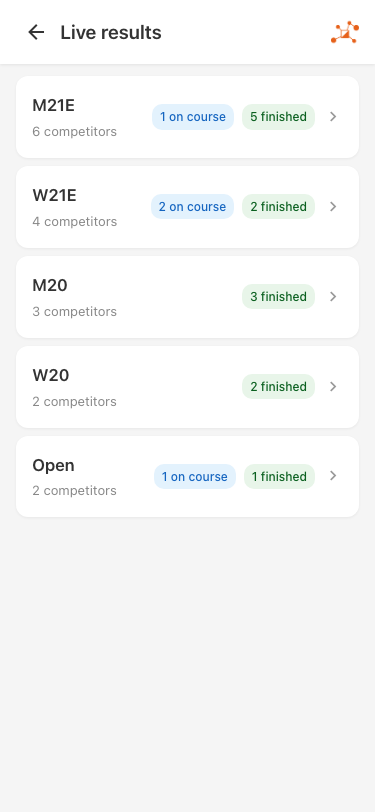
Leaderboard and Commentary screens show on-course runners in the class tables — with their running time ticking up, a projected time where Show projected times is on and a radio split allows one, and On course in place of a time when there's no start time yet. See Leaderboard, TV screens and Commentary.
None of them count a runner who has only checked in. Reaching the check is not starting, so to the crowd that runner is still waiting to start, and the commentary feed doesn't announce them as a starter until they actually go. In a relay, the crowd sees a runner go out at the mass start (leg 1) or when the previous leg comes back — never at the check.
Once a course closure passes, though, a checked-in runner nobody has seen come back is marked Overtime, and from then on the spectator class lists' "on course" badges count them too, as they count any Overtime runner nobody has seen come back: at that point they are somebody the event cannot account for, not somebody waiting to start.
The Pending downloads info screen
The info screens include Pending downloads — the same names as the dashboard tile, sized to be read across a tent.
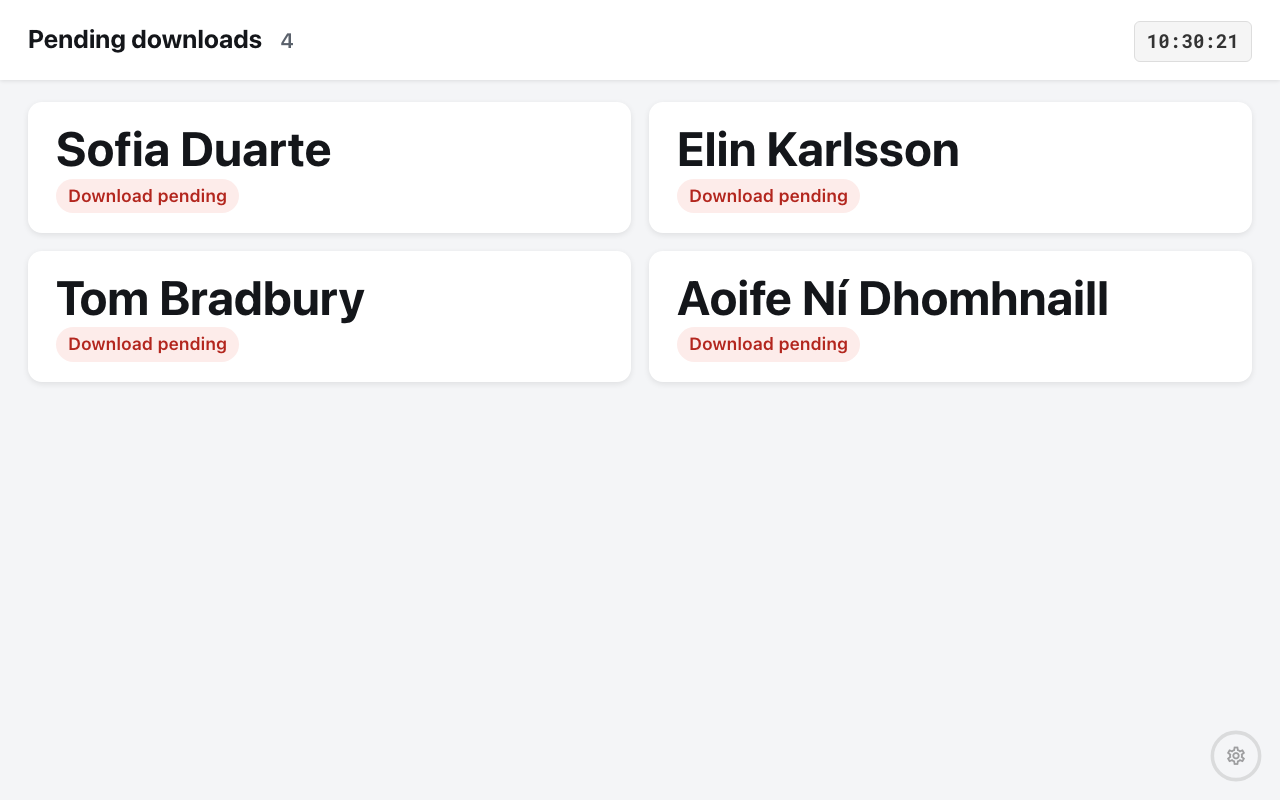
Prop it up at the download tent and it chases the cards for you: the names sit there, longest-overdue first, until the card is read. Deliberately, runners still on course are not on it — they are a different problem, and putting them on the same screen would bury the two or three names the tent is actually chasing.
Like the tile, it carries cards no entry accounts for — by number, or by the runner and which run it is.
The Radio control info screen answers the neighbouring question — who has just come past a chosen radio control — which is how you see the field still moving through a spectator control or a changeover.
Asking an AI assistant
If you have AI assistants switched on, "who is still out on course in M21E?" is a question you can simply ask, and the assistant reads the same data these screens do. It is the fastest way to slice the question in a way no screen offers ("who is still out from Bushflyers?"), and it can read the radio punches behind each answer.
Two things to hold on to when you do:
- An assistant reads what Manager knows. It is no better informed about the forest than the On course list is.
- Results it quotes while anyone is still out are provisional; the tools tell it so, and a good assistant will say so back.
The cross-check that isn't a screen
Every screen on this page is Manager's belief, built from start times, radio punches and downloads. When you need proof, read the units themselves with Station Memory:
- the finish unit's memory says who actually punched the finish — anyone in it is out of the forest;
- the start unit says who actually went out, which is what separates a genuine missing runner from a no-show who never turned up;
- the check unit says who reached the check — present at the start area, not necessarily out on the course. Reading it checks those runners in, which puts them on your own on-course lists until something says they're back.
Applying those records also moves people in and out of the on-course count, which is why reading the finish station is the strongest single tool for clearing the list at the end of the day. Note that contactless (SIAC "air") punches are never recorded in a station's memory.
What the counts include
Four quirks are worth knowing before you read too much into a number:
- Overtime does not empty the list. If your event declares a course closure, everyone still out at that time of day is marked Overtime — but that is a statement about their result, not a sighting, so they stay in every count and list on this page until something says they are back: a race time, a radio finish punch, a downloaded card, or a finish station read. Emptying these screens on the clock is exactly what you would not want them to do. The same applies to an Overtime you set by hand — it is a call about a placing, not a sighting. (And the same goes for the Pending list: the
OK*runners the closure moved to DNF are still on it, still waiting for their card to be read.) - No-shows are counted. Anyone whose allocated start time has passed is flagged on course, even with no start punch — so the list normally includes every entrant who never turned up. Clearing them (Set competitors DNS) is what makes the rest meaningful. See Marking no-shows as DNS.
- Checked-in runners are counted. A check punch — by radio, or read from the check station's memory — does not start anybody: their status stays blank, and nothing public shows them as out. But somebody who checks in and then never punches the start may be out there, so Manager counts them in the tile, the On course dialog, the competitor list's On course filter and the class list's column until a radio finish, a card download, a finish station read or a status you set says otherwise. The same goes for a relay runner who has checked in while still waiting in the changeover pen. The Checked in tag appears only while the check-in is the only reason they're listed — once they're out on course by any other measure, the tag would tell you nothing. At course closure they become Overtime, not DNS, so they stay on the list (and from then on the tag goes, since Overtime keeps them there in its own right); the bulk Set competitors DNS leaves them out. Mark them DNS yourself once you know they didn't go.
- Cards no entry accounts for are counted in the tile and the On course dialog — an unidentified card out on the course is still somebody out on the course, and so is a competitor out on a second run.
More than one run on a card
At a local event or a schools day, a competitor may run more than one course on the same card. They finish the first, download, and their result is final — then they clear, check, and go through the start again.
Manager cannot put that second run on their entry: the entry is a completed result, and a second run must not overwrite it. What it does instead is show the run as a card nothing accounts for, on the same rows it uses for a card nobody is entered against — named from the entry where it can be, and labelled with which run it is (Jordan Blake, run 2). So the runner is on the On course list while they are out, and on the Pending lists when the radio sees them finish, exactly like anybody else. When they download, the card is offered to you as a reused card, with its owner ready to duplicate for the second run — which is what closes the row.
Three things worth knowing:
- A card somebody is still to go out on is not this. Where a family shares one stick between courses, the sibling who has not run yet is the one a fresh start punch belongs to, and they appear on the On course list under their own name in the ordinary way. A run is only treated as unaccounted-for once every entry on the card has finished.
- The second run needs the start or check unit on the radio. That is how Manager tells a runner who has gone round again from a stray read after everybody is home. Without a radioed start or check box, a repeat run is not picked up until the card is downloaded.
- Entering the second run in advance is still the tidier way to run it. A competitor entered in both classes has two entries, and the second behaves like any other entry from the moment they start. The behaviour on this page is what covers you when nobody got round to it.
Related
- Safety check: accounting for everyone — the end-of-day procedure
- The event dashboard — the Competitors tile in context
- Status and race time rules — what puts a competitor in each status
- Station Memory — reading a unit's own punch backup
- Event info screens — the Pending downloads and Radio control screens
- Radio punches — the punches these views are built from
- Resolving issues on the day — fixing a wrong picture