
Appearance
Results
Audience: Event organisers and timing operators checking, sharing and publishing results, during the event and after it.
How to read the Results screen, get results to spectators while the event runs, settle and publish the final results, and produce prize-giving lists.
The Results screen
Open the event and choose Results in the side menu. It lists each class with its competitors in place order, and updates by itself as cards are downloaded and radio punches arrive, so you can leave it open.
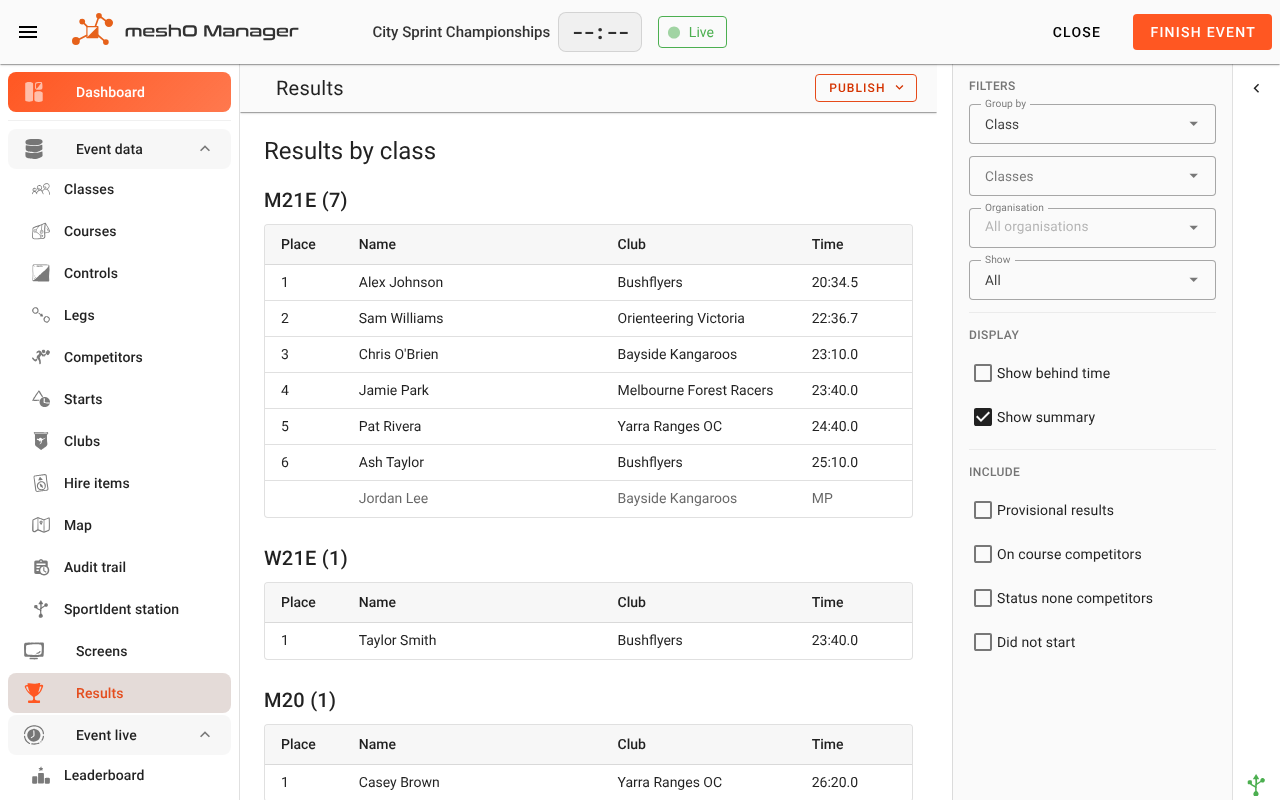
Each class shows:
| Column | What it shows |
|---|---|
| Place | The finishing place. Only competitors with an OK result have one. |
| Name, Club | The competitor and their club. Club is left out when you are looking at one club's results. |
| Behind | How far behind the winner, when Show behind time is ticked. On a score course it's how many points behind. |
| Points, Penalty | On a score course only: the points collected, and what the time limit took off, if anyone lost any. |
| Leg time | In a relay class: each runner's own time on their leg (see Relays). |
| Time | The race time, including any adjustment you made. For anyone without an OK result it shows their status instead: MP, DNF, DSQ and so on. |
Finishers come first, in place order; competitors with any other result follow them, greyed out. How ties and the order of non-finishers are decided is in How results are ordered.
Below the classes, Summary gives a line per class: how many entries, the winning time, and how many have each status. Its On course column is the quickest way to see which classes are still incomplete.
Choosing what's shown
The panel on the right changes what's on the screen, and what Print view and Export PDF produce from it. It is reset when you leave the screen.
Filters
| Option | What it does |
|---|---|
| Group by | Class (the default) or Course. By course puts everyone who ran the same course into one list, whatever their class. |
| Classes / Courses | Only these classes or courses. Leave it empty for all of them. |
| Organisation | Only competitors from these clubs: results for one club's newsletter, say. The heading becomes "Results for club". |
| Show | All, or only the Top 3 to Top 10 of each class. |
Display
- Show behind time — adds the Behind column. Off to begin with.
- Show summary — the summary table at the bottom. On to begin with.
Include
These add competitors who are normally left out of the lists. All four are off to begin with:
- Provisional results — competitors who crossed a radio finish but whose card hasn't been downloaded. They have a time and a place, marked with
*, and may still change: the card might show a missed control. See Provisional vs final OK. - On course competitors — those still out, for a picture of the class with the field not yet home.
- Status none competitors — those nobody has accounted for yet.
- Did not start — those marked DNS.
Note: Include only changes what you see here. An exported results file, or an upload to Eventor, always accounts for everyone in the classes you choose, whatever is ticked. See What an exported results file contains.
Relays
A relay class lists each team with its place and total time, and the team's runners underneath in leg order. For each runner, Leg time is their own time on their leg, with a status beside it if their leg went wrong, and Time is the team's running total at their changeover. On the last leg, that is the team's result. See Relay events.
Results while the event is running
The Results screen is for you. Spectators, competitors and the people at home see results elsewhere, and each of these updates on its own as the race goes on:
| Where | Who sees it | Set up on |
|---|---|---|
| TV screens at the arena | Everyone at the event | TV screens |
| The spectator site and the kiosk, on phones and a tablet at the arena | Anyone on the event's network | Spectator site and kiosk |
| Commentary | The commentator | Commentary |
| liveresultat.orientering.se | Anyone on the internet | Event details → Live results (see Publishing live results online) |
| The meshO cloud | Anyone on the internet, once the event is published there | Settings → Cloud sync, and Event details → Cloud sync for each event (see Publishing live results online) |
| A live export file, rewritten every few minutes, for another results system to read | That system | Event details → Backup & export → Live export (see Creating an event) |
Each of these shows the race as it happens. Runners still on course appear as on course, and a radio finish appears with its time before the card is read. That's the point of a live feed, and it is different from the final results file below.
Two things hold results back on purpose:
- Results quarantine. An elite class can have its results held back from every public screen until a set time or the last start, while its start list stays visible. You still see everything here. See Results quarantine.
- liveresultat only publishes while the event is live. Nothing is sent before Start event, or after the event is finished.
Publishing the final results
When the last runner is home and every result is settled, publish from Publish at the top of the Results screen:
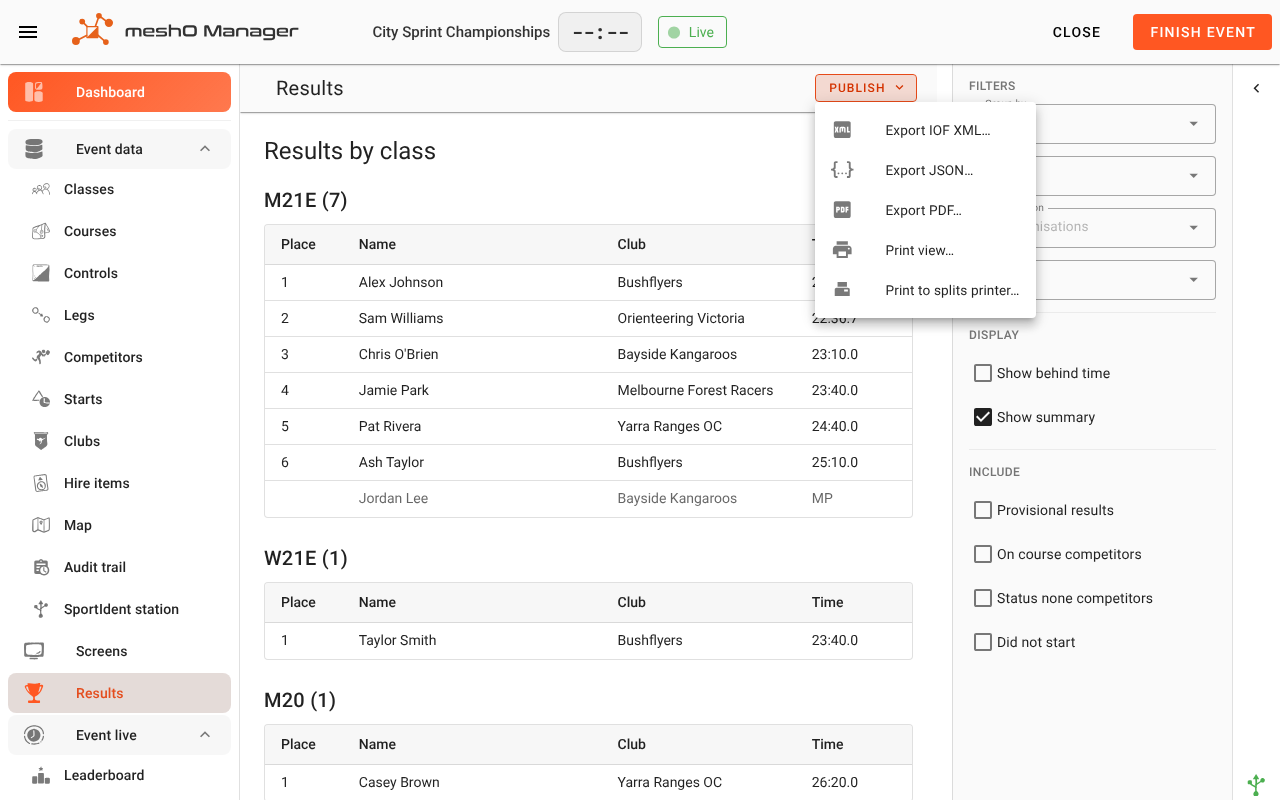
| Item | What it does |
|---|---|
| Export IOF XML… | The standard results file for other systems, and for uploading to Eventor by hand. |
| Export JSON… | The same results in Orienteering JSON. |
| Export PDF… | A results document to share or archive. |
| Upload to Eventor… | Sends the results straight to the event on Eventor. Only offered when Eventor is set up in Settings → Eventor. |
| Print view… | Opens the browser's print dialog with a printable page of the results. |
| Print to splits printer… | Prints a results sheet on a thermal printer (see Prize-giving and the results board). |
Each opens Publish options first. For the PDF and the print view you choose the classes, the grouping, the clubs, top places only or everyone, and whether to show the behind time and the summary. For a file or an upload you choose the classes and whether competitors marked DNS go in (Include DNS competitors). If anyone in the file was timed from a check punch or from midnight rather than a recorded start, the dialog says how many: their times and places go out as they are, so check them first if that matters. The options for a file, such as one country's results or combined classes for the World Ranking, are covered in Exporting data.
Settling everyone first
A results file says what became of everyone who took part, so Manager checks first. If anybody in the classes you chose still has no status, is still on course, or has only a radio finish, you see Event not finalised instead of the options:
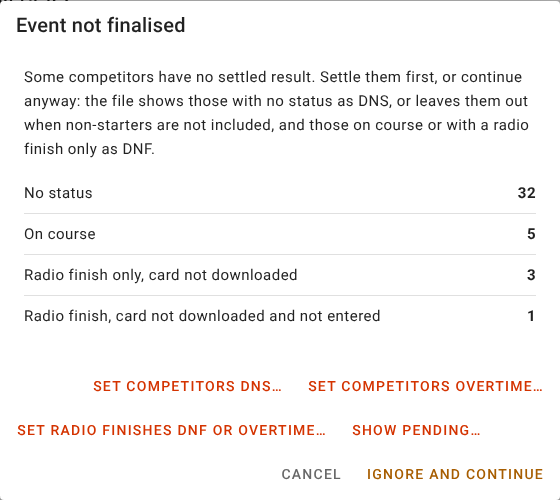
Its buttons settle each group: Set competitors DNS… for those who never started, Set competitors overtime… for those still out, and Set radio finishes DNF or overtime… for finishes whose card was never read. Show pending… covers a card that finished but belongs to nobody. Once everyone is settled, Manager carries on to the publish options.
Ignore and continue publishes anyway. Those with no status go in as DNS, and those still out or with only a radio finish as DNF. Settling them properly is better: a DNF in a published results file is a statement about a runner. The full rules, and how this works at a multi-day event, are in What an exported results file contains.
Finish event runs the same check. There the button reads Finish anyway, and it isn't offered while a radio finish is still waiting for its card (or a card that finished belongs to nobody): download the card, or settle it with the buttons, first. So the usual order at the end of the day is:
- Download the last cards and settle anyone left over (the dashboard's On course and Pending counts show who).
- Click Finish event.
- Publish: upload to Eventor, export the file your federation wants, print or export the PDF.
There is no separate "mark as official" step. A result is final once the card is read, and the file is complete once everyone is settled. If cloud sync is on, finishing the event also publishes it to the cloud (see Publishing to the meshO cloud).
When a result is disputed
A protest or a mistake found later is fixed on the competitor, not on the Results screen. Open the competitor (Edit competitor):
- To disqualify, or to record DNF or Overtime, change the Status on the Result tab.
- To give a control a runner did visit, override the punch on the Overrides tab. You can't set OK directly while the card shows a missed control: Manager checks OK against the punches, so a corrected punch is what turns an MP into an OK.
- To correct a start or finish time, use the Overrides tab as well.
The Results screen, the public screens and the live feeds update straight away. A file you have already exported or uploaded does not: export or upload it again. The competitor's Audit trail tab records what was changed and when (see Audit trail). For more recipes, see Resolving issues on the day.
Prize-giving and the results board
For the presentation, set Show to Top 3 (or however many places you award), choose the classes, then use Print view or Export PDF. A results list cut to the places being presented makes a straightforward script for whoever reads them out.
To pin results up at the arena as they come in, use Print to splits printer…. It prints a results sheet on a printer, with its own choice of classes, top places and columns, and a preview of the sheet before you print. It opens on the printer this computer's splits go to, and you can choose any other printer this computer can use (see Printing splits):
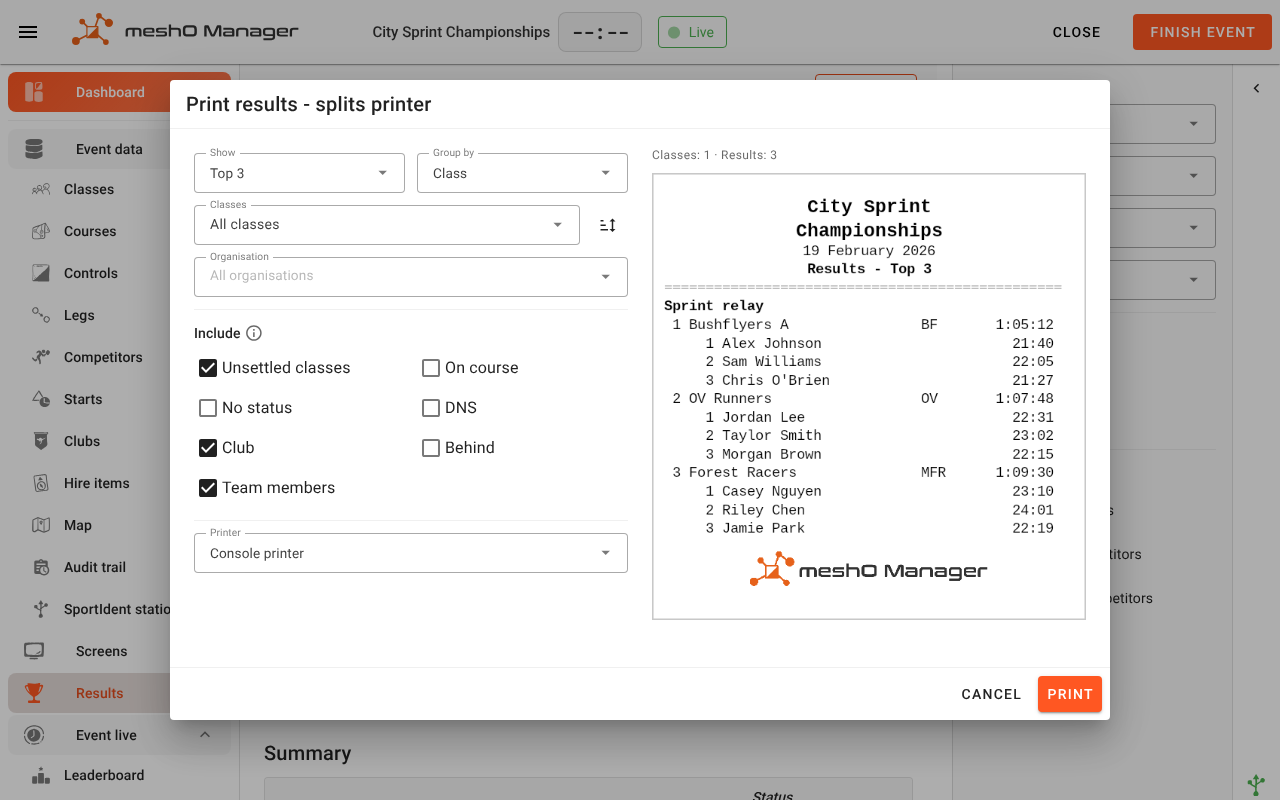
- Unsettled classes includes classes where somebody still out could yet take a place; they are marked with an asterisk. Leave it off to print only classes whose places can't change: those are safe to present.
- On course, No status and DNS add those competitors to the sheet as well as the finishers.
- Club and Behind give each its own column. A narrow roll drops them so the names stay readable.
- Team members lists a relay team's runners under it, each with their own leg time.
Overall results for a multi-stage event
A stage of a multi-stage event has its own results, read here exactly like any other event's. The combined result across the stages lives on the carnival's Standings tab, not here: open the group header on the Events page.
The standings show, per class, each competitor's position, their contribution from each stage, and their total. They update live as a stage runs, so the overall is correct within about half a second of a card being downloaded. A stage that didn't count is struck through with the reason, and a total that is still provisional carries *.
See Standings for what the columns and statuses mean.
The overall result of a knock-out competition
A knock-out competition is decided by how far each competitor got, not by a total, so its overall result is a classification rather than standings. It lives on the competition's Classification tab.
It updates by itself as cards are downloaded, so it can stay up on a second screen through the final. Export CSV at the top of the tab downloads it: each competitor's overall place, and the place they took in each round. Each round's own results read and export here exactly like any other event's. See Knock-out competitions.
Related
- Exporting data — the IOF XML and JSON files, one country's results, combined classes
- Status and race time rules — what each status means, and what a results file contains
- Who is still on course
- Resolving issues on the day
- Results quarantine
- Publishing live results online — liveresultat and the meshO cloud
- End-of-event checklist
- Leaderboard — the live results board inside Manager