
Appearance
Station memory
Audience: Timing operators reading a SportIdent unit's memory: to account for everyone, recover punches the radio missed, or check a unit's clock.
Every SportIdent control unit keeps a backup of every card that punched it. Reading that memory into Manager tells you, for certain, who punched the start, the check or the finish, even when the radio didn't hear them.
When to read a station
- At the end of the day, to account for everyone. Read the finish unit: anyone in it came back. That's the strongest way to clear the On course list. See Safety check.
- After the start, to find the non-starters. Read the check or start unit: anyone entered who isn't in it, and nothing else has seen, didn't start.
- When a radio control or radio finish missed people, or you suspect a unit misbehaved.
- Before the event, to check a unit's clock against the computer's.
What you need
- A SportIdent USB station (a BSM7 or BSM8) plugged into the computer you're using, and connected in the browser. Manager calls it the direct station; it's the same reader card download uses.
- The coupling rod, to connect it to the unit you're reading, which Manager calls the remote station.
- A browser with Web Serial: Chrome, Edge, or Firefox 151 or later. On a computer other than the server, use the secure link (see HTTPS and certificates). On a Mac you also need the CP210x driver (see SportIdent USB stations on macOS).
One reader serves the whole of Manager. Connect the station here, on the dashboard's Download card tile, on the Card downloads page or on Station configuration, and it's the same reader everywhere, with card download still working. Card downloads pause while a memory is read, cleared or a clock set, and carry on afterwards. A card presented during one of those isn't downloaded and has to be presented again, and a memory read is refused while a card is being downloaded. Disconnecting here disconnects card download too.
Reading a station
Open the event and choose SportIdent station under Event data in the side menu. It's there whether the event is in setup, live or finished.
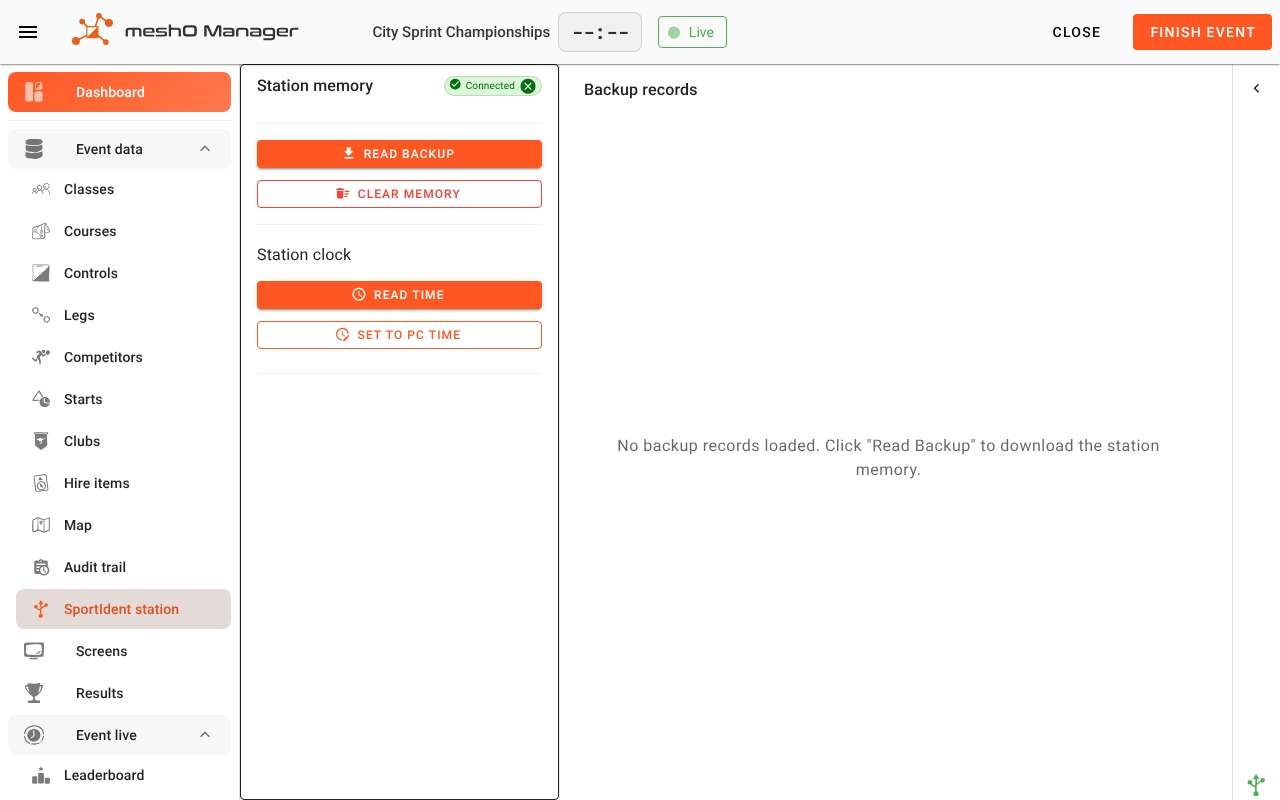
- Connect the reader, if it isn't already (Connected shows at the top of the panel).
- Place the remote station (the unit you're reading) against the direct station with the coupling rod.
- Click Read backup. Manager shows the unit's mode (START, CHECK, FINISH, or the control it's set as), how many records it holds, and whether it uses SportIdent's extended or legacy protocol, then reads its memory. The records appear under Backup records, each with its card number, the competitor it matches, and the date and time of the punch.
Reviewing the records
The list opens on Missing: records that would change something, leaving out the ones Manager has already applied. All shows every record. Every record in Missing starts ticked, so applying takes the whole memory; untick anything you want left out, such as a stale card from last weekend.
- Today only is on to begin with, and hides records not dated today on this computer's clock. Reading a station the day after the event? Switch it off, or nothing shows.
- Time not recorded — the record has no usable time. It's still applied, with the time left blank: the card touched the unit, and that's what you're reading the memory for.
- Date unreadable — the record's date didn't decode, so it may be damaged. It starts unticked; tick it to apply it. Its time is never used.
Applying them
Click Apply to selected. Each record is recorded on the matching competitor as a station download, and their status changes:
| Unit | What applying does |
|---|---|
| Start | Someone not yet started is marked On course. |
| Check | They're checked in, and counted on your On course list until they're back. Their status doesn't change. |
| Finish | Anyone with no status, or still on course, is marked DNF: they came back, but there's no result until their card is downloaded. |
A finished competitor, or one with a status you set, isn't changed, except that a DNS nothing had seen is taken back when a station shows them. The full rules, and why the order you read stations in doesn't matter, are in Applying station records also changes status.
Afterwards Manager reports what happened: how many were applied, how many were already set, how many failed (each listed by card with the reason), and any DNS it took back, by name. Applying the same memory again is safe: records already applied are skipped.
Cards nobody is entered on
Records whose card isn't held by anyone in the event are listed under Unmatched cards. From a start or check unit, Create unknown competitors adds an Unknown competitor for each, on course or checked in, so a runner nobody knew about is on the list to account for. Unmatched cards from a finish unit are listed for information only: someone who came back isn't missing.
Who is accounted for
Once a start, check or finish unit has been read in full, the panel shows Who is accounted for, and keeps it up to date:
- No record of starting — entered competitors nothing has seen. After the check or start unit is read with everyone gone, these are your non-starters: Review, untick anyone you know started, and Mark as DNS.
- Still out — competitors something saw go out, and nothing has seen come back. After the finish unit is read, this is the list to chase.
If some of the memory's records weren't applied, the panel says how many, because they may name someone it lists as unseen. See Who is accounted for.
Recovered punches and radio punches
A station download is kept separately from the radio punches. A runner whose finish the radio already heard isn't counted twice, and the card download still decides their result.
Clearing a station's memory
Clear memory erases every record in the unit, after you confirm. It can't be undone.
Clear a unit's memory before an event, so that last event's cards don't appear in it, and only after you've read anything you might need. Don't clear a unit during an event: its memory is the backup for the radio.
The station clock
Read time shows the unit's clock and how far it is ahead of or behind this computer. Set to PC time sets it to this computer's time. Check every unit's clock before it goes out: a unit with the wrong time puts every punch in the wrong place. If one was out on the day, correct its punches with a Time Offset on the control rather than changing the unit's clock afterwards. See Time Offset.
When something goes wrong
- "The direct station was left in an unknown mode". Reading switches the direct station to remote mode and back. If that was interrupted, disconnect the reader and connect it again, from here or anywhere else. Card downloads may not work until you do.
- "This station is in … mode, so its memory holds whole card images". A unit set up to store card images keeps nothing Manager can read back.
- "The station's memory has filled and wrapped". The oldest records were overwritten by newer ones and are gone. Read units more often, or clear them before each event.
- A read stops part-way, or reports the wrong part of the memory. Check the coupling rod is seated, then read the memory again.
Related
- Safety check: accounting for everyone
- Who is still on course
- Radio punches
- Downloading cards
- Station configuration — setting a unit's code, mode and switch-off time, and programming many units at once
- SportIdent USB stations on macOS