
Appearance
Late entries and the registration desk
Audience: Registration desk volunteers and timing operators handling on-the-day entries and changes.
How to enter people on the day, set them up with a class, a card and a start, and handle the changes the desk is asked for: a different class, a different card, somebody not running after all.
You can add people at any time
Manager doesn't lock the entry list when the event starts. Someone entered at 11:00 is as much a competitor as someone imported a week ago: they appear on every screen straight away, their card download is matched to them, and they're in the results.
There are three ways in:
- The registration desk, a screen of its own for the entry table (summarised below). This is the usual way on the day.
- Competitors → Actions → Add, or the + on the dashboard's Quick competitor actions tile, at the operator's own console.
- A card download. A card nobody holds can be assigned to an existing competitor, or used to add a new one, from the Card downloads page. At a low-key event, Manager can enter unknown cards for you.
The registration desk
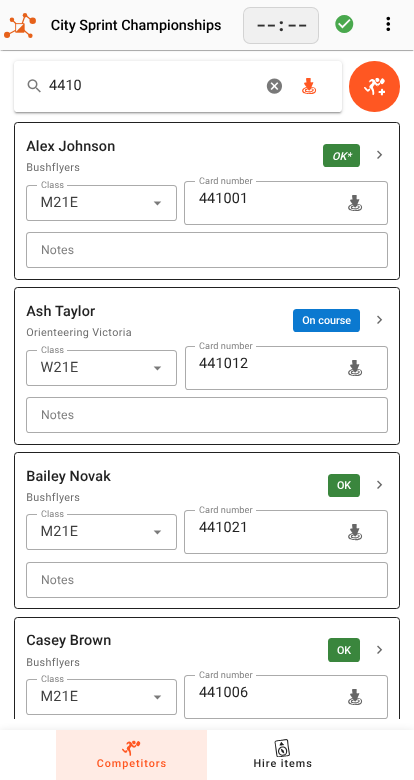
The registration desk is a cut-down Manager for the entry table: find someone, fix them, or add them, and see what's on hire. It runs in a browser on a laptop or tablet. Take its link from Settings → Server (the Registration link). On a laptop with a card reader, use the IP link; see Reaching the server. Several desks can run at once, alongside the operator's console. This section covers the entry work; for setting the desk up, its PIN, its top bar and what it leaves out, see The registration desk.
The desk lists the running event and any event dated today or later that hasn't been finished or abandoned. Pick the event, and you get two screens in the bottom bar: Competitors, and Hire items (see Hire items).
Finding someone
Everything goes in the one search box: a name or part of one, a card number, a class, a club, a bib. The list stays empty until you type, then shows everyone who matches.
With a SportIdent reader plugged into the desk's laptop, putting a card on the reader types its number into the search box. That's the fastest way to find a runner: they hold out their card, and the desk reads the answer. If exactly one competitor holds that card, their Edit competitor dialog opens straight away. Connect the reader from the icon in the top bar the first time; see Downloading cards for readers and browsers.
Reading a card at the desk only reads its number. It doesn't download the card or record a result.
Fixing someone on the spot
Each match is a card with the three things the desk changes most often, right on it:
- Class: they entered the wrong one, or moved up.
- Card number: they're carrying a different card, or a hire card. With the caret in this box, a card put on the reader fills it in for this runner rather than searching.
- Notes: anything someone needs to know later, such as "borrowed card, back Sunday". See Notes.
Changing any of them shows Save and Revert at the foot of the card. Nothing is sent until you press Save, so a card number read out a digit at a time is one change, not seven.
The chip at the top right is their status: whether they've started, are out on course, or are back with a result. A runner who already has a result can still change class, but Manager then scores their run again against the new class's course.
For anything else (their name, club, start time, IDs), tap their name. That opens the same Edit competitor dialog the operator uses, with the same tabs and the same rules — including setting a status such as DNS, or deleting the entry, so take care. See Competitors, clubs and teams.
Adding someone
Press the orange add button beside the search box. When a search finds nobody, the screen offers Enter as a new competitor too, with the name you searched for already filled in. A card the reader can't find in the event offers Add, with its number filled in.
Lock, under the ⋮ menu, signs the desk out when Manager has a PIN (see Settings → Access protection). Use it before you leave the table unattended.
Adding a competitor
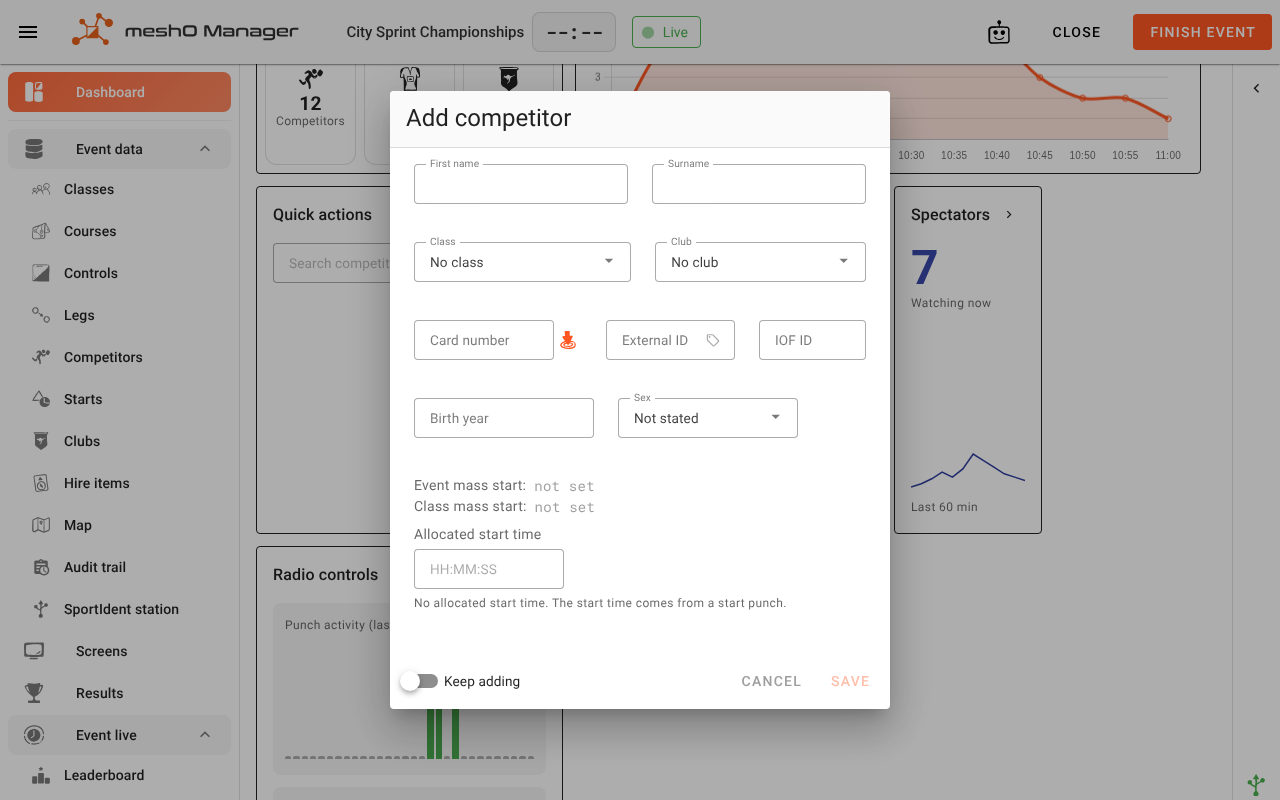
Whether it's opened from the desk or from Competitors → Actions → Add, it's the same Add competitor dialog:
What you need, and what can wait
| Field | On the day |
|---|---|
| First name / Surname | At least one. As you type, Manager suggests people from the Competitor Registry; picking one fills in their club, card and IDs. |
| Class | Needed for a result: someone without a class can't be scored or ranked. |
| Card number | Can be left blank and filled in later, or by their first card download. |
| Club | Optional. No club is fine. |
| Allocated start time | Optional at an event with a start punch. See Giving them a start time. |
| External ID, IOF ID, Birth year, Sex | Optional. Filled in by the registry when you pick a registered person. |
Saving without a class asks first. You can choose a class right there, Add without a class anyway, or go back. Someone entered without a class is still on every list, and still has their card read; they just can't be placed until they have one.
Reading the card number off the card
With a reader connected, the Card number field listens for a card: put the runner's card on the reader and its number fills in. It isn't downloaded. The reader icon beside the field turns this off and on, for when the card isn't in front of you: an entry taken over the phone, or a hire card handed out later. Your choice holds while the screen stays open.
A card can fill in the whole entry. If the registry knows whose card it is, presenting it fills in their name, club and IDs as though you had picked them from the name fields, leaving you only the class to choose. It won't do that when:
- nobody in the registry has that card: only the number is filled in;
- two people in the registry have it: Manager won't guess which one, so only the number is filled in;
- you've already typed a name: the runner in front of you is whoever you typed. The card in their hand may be borrowed, or a hire card that was someone else's last time. The number fills in, and the name stays yours.
If the name was filled in from one card and you then present a different one, the first card's person is replaced, or cleared if the registry doesn't know the new card.
Typing the number does the same as reading it, so a desk without a reader can still fill an entry from the registry.
Entering a queue: Keep adding
Switch on Keep adding before you save, and the form clears for the next person instead of closing, with "Added name" beside the switch. The class is kept, because a queue is often one class at a time. Everything that identifies a person, such as their name, card, club, IDs and start time, starts blank, so one runner's card never ends up on the next runner's entry.
When Manager thinks they're already entered
If someone already in the event has the same name, or the same card number, saving shows Possible duplicate with the matches listed. If it's a different person, click Add anyway. If it's the same person, cancel and work on the existing entry instead. (When the dialog was opened from a card download, it also offers Assign download, to give that card to the existing competitor.)
Two people holding the same card number is allowed, and flagged Duplicate on the Competitors list. That's fine for two people sharing a card at different times, and a problem for two running at once. See Card numbers.
Giving them a card
Their own card goes in Card number. For a hire card, put the hire card's number in the same field: if it's in the hire pool (Settings → Hire card registry), Manager marks them as being on a hire card, so the download desk is reminded to collect it. Compasses, map boards and anything else you lend are ticked on the competitor's Hire items tab. See Hire items.
Giving them a start time
A late entry needs a start time to have a race time. Choose whichever way your start works:
- They punch a start unit. Leave Allocated start time empty. Their start punch, read from their card when it's downloaded, becomes their start time. See Start times.
- They're given a start time. Type it into Allocated start time, in their class's lane. To find a free one, look at the order screen of the start draw (Starts): a draw with Reserve a gap every N starters leaves empty slots for exactly this, and you can see where they are. See Drawing start times. Manager doesn't pick a free slot for you.
- The class has a mass start. Nothing to do: they start with the class.
You can change it later from Edit competitor → Start, and the order screen shows them once they have a time.
When someone isn't running after all
- Entered, but not starting: set their status to DNS (Edit competitor → Result). They stay in the event and go into the results file as a non-starter, which is what Eventor and your federation expect. At the end of the day, Competitors → Actions → Set competitors DNS does everyone who never started in one go.
- Entered by mistake, or twice: delete the entry (Edit competitor → Details → Delete). Deleting is permanent, and only right for an entry that should never have existed. The deletion is recorded in the audit trail.
Marked DNS, then they turn up
A DNS you set is a ruling, and Manager keeps it through everything that happens later, including a card download. So if someone was marked DNS and runs after all, take the ruling back: open them, go to Result, and press Auto beside the status. Manager then works their status out from what it knows again, from their download if they've already finished. Do it before or after they run; either works.
What everyone else sees
A late entry or a change at the desk reaches every screen within a second or so: the operator's console, other desks, the download desk, TV screens and the spectator site. Nobody has to refresh.
Every change made at the desk is recorded in the event's audit trail with the source Entry desk and the name of the computer it was made at. To see what the desk changed today, filter the Audit trail screen by Source: Entry desk. See Audit trail.
To carry today's new cards and class changes into the next event, use the changes report. It lists people Entered on the day too.
Common problems
| Problem | What to do |
|---|---|
| The card number is already someone else's | Manager flags it Duplicate. If the other person isn't running at the same time, it's fine. If they are, one of them needs a different card, or the download will land on the wrong person. |
| The same person is in the list twice | Delete the extra entry. If cards have been read against both, move the download to the right one first from Card downloads. |
| The card on the reader fills in the wrong person | The registry knows that card as someone else's: a borrowed or hire card. Type the right name; Manager won't overwrite a name you typed. |
| The desk can't see the event | It has been finished or abandoned, or it's dated before today and isn't the running event. Check the event's date and status in Manager. |
| A class is "full" | Manager has no entry limit per class. If you need one, it's your call at the desk. |
| Someone ran but their result says DNS | See Marked DNS, then they turn up. |
Related
- The registration desk
- Competitors, clubs and teams
- Hire items
- Start times
- Downloading cards
- Resolving issues on the day
- Changes report
- Low-key events — entering unknown cards automatically at download, for events with no entries beforehand