
Appearance
Built-in assistant
Audience: Event organisers and timing operators who want quick answers while they work.
meshO Manager can answer questions typed in your own words, right inside the app:
How do I import entries?How do I give someone a hire card?How many people mispunched today?Who is still out on course?
The answers are written by Claude, an AI model made by Anthropic, through a meshO service on the internet. There is nothing to install and no account to create. To begin with it answers questions about using meshO Manager: nothing is sent anywhere until somebody asks a question, and then only the question and pages of the documentation. Answers about the event itself are something an organiser turns on, in the welcome tour or in Settings → AI assistants, and it can be switched off altogether there too.
This is different from AI assistants (MCP), which connects an assistant you run — Claude desktop, or another app — to your event. The built-in assistant needs no setup on your side, and it can only read: it can never change your event.
Turn it on
Open Settings → AI assistants (under System). The built-in assistant is at the top of the page; choose how much it may see:
| Choice | What it answers | What leaves this computer |
|---|---|---|
| Off | Nothing. The Ask button is hidden. | Nothing. |
| Questions about using meshO Manager (the default) | How to do things in meshO Manager, from the documentation that came with your version. | Your question and the documentation pages it needs. No names, times or results. |
| Questions about using meshO Manager and about the open event | The above, plus questions about the event you have open: results, start lists, who is still out, radio punches. | Your question, and the parts of the event needed to answer it — competitors' names, clubs, times and statuses. |
The change takes effect straight away. No restart is needed.
Ask a question
Open an event and click the Ask button in the top bar. It carries the same icon as the AI assistants settings page. Type your question and press Enter.
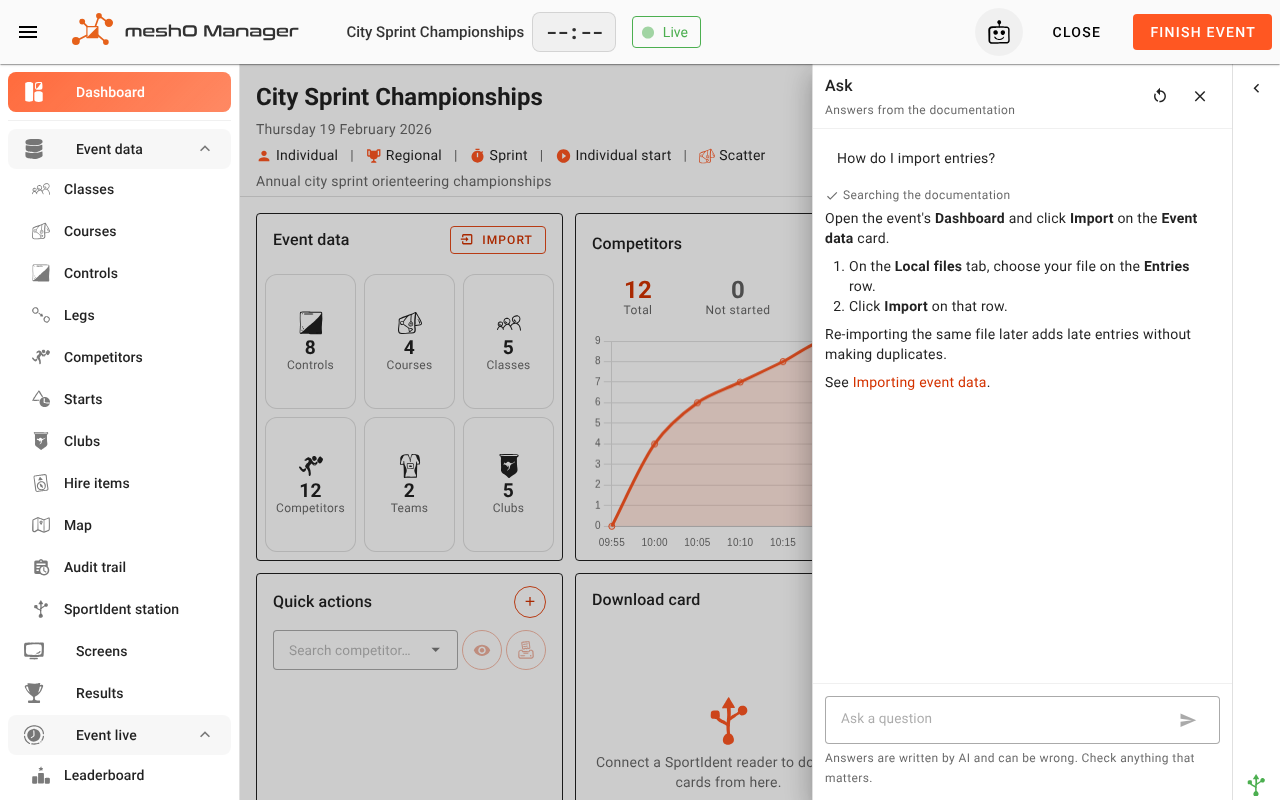
The answer appears as it is written. Underneath your question you can see what the assistant looked at — Searching the documentation, or Reading the event (get_results) — so you can tell where an answer came from. Answers about how to do something end with a link to the documentation page they came from; it opens in a new tab, from the copy of the documentation built into meshO Manager.
The conversation stays while the panel is open on this event, so you can ask a follow-up ("and in W21?"). Click the restart arrow to start again. Closing the browser tab, opening another event, or changing the setting starts a new conversation. Nothing you ask is saved to the event.
What it will and won't do
- It only reads. It cannot change a competitor, a class, a result or anything else, and it will not offer to.
- It only states a number it has read. If it could not read something, it says so rather than guessing.
- "I couldn't find that" is not "you can't". The assistant finds pages by the words in your question. If you call something by a different name from the documentation, it can miss the page. Ask again in other words, or look the task up in Find a task, which lists tasks under the ways people ask for them.
- It can be wrong. Answers are written by AI. Check anything that matters — a placing you are about to announce, a disqualification — against the screen it came from.
- Results that are being held back are visible to it, because you are the operator. It says when a class's results are held back, so you don't pass them on by accident.
What is sent, and where
When you ask a question, meshO Manager sends it to the meshO assistant service (at assist.mesho.live), which passes it to Anthropic to write the answer.
- With "Questions about using meshO Manager", only your question and excerpts from the documentation are sent.
- With "…and about the open event", the parts of the event needed for the answer are sent too: competitors' names, clubs, classes, card numbers, times, statuses and radio punches.
- Birth years and sex are never sent, under either setting. The assistant can read the event's change history, but changes to either are shown to it without their values.
- The meshO service keeps the text of each question for 30 days, so meshO can see what people need help with and improve the documentation. It is deleted after that. The answers are not kept, and nor is anything read from your event. A question is kept as you typed it, so avoid typing anything private into one — a competitor's phone number, say.
- It also records which installation asked, when, and how much text was involved, to keep the service within its budget.
- Anthropic handles the text under its commercial terms for the Claude API.
No internet?
The assistant needs an internet connection. Without one, the panel says Can't reach the assistant and nothing else in meshO Manager is affected. Running the event never depends on it.
Limits
Each computer has a daily allowance of questions. If it is used up the panel says so, and it resets at midnight UTC. A question that would need a very long answer, or a great many look-ups, is stopped with a message asking for something narrower — "who is still out in M21E?" rather than "tell me everything about today".
Troubleshooting
| What you see | What to do |
|---|---|
| No Ask button | The assistant is off. An organiser can turn it on in Settings → AI assistants. |
| Can't reach the assistant | This computer has no internet connection, or a firewall blocks assist.mesho.live. |
| Today's assistant allowance for this computer is used up | Wait until midnight UTC, or use the documentation directly. |
| The assistant is paused | The service is paused for everyone. Try again later. |
| It says it can only answer questions about using meshO Manager | The setting is Questions about using meshO Manager. In Settings → AI assistants, choose the option that includes the open event. |
Related
- Find a task: tasks listed under the ways people ask for them
- AI assistants (MCP) — connect an assistant of your own, which can also make changes if you allow it
- Settings
- Results quarantine