
Appearance
Backup and restore
Audience: Event organisers protecting event data and recovering from problems.
How to back up an event (and when to), how to restore from a backup, and what to do when an event can't be saved or won't open.
Card downloads are always kept twice
Card downloads are the one part of an event that can't be typed in again. Once the runner has cleared their card, its punches exist nowhere else. So Manager protects them whether or not you ever take a backup.
Every card download is saved to disk as a file of its own before anything else happens to it. Only then is it processed and matched to a competitor. Each read is kept as its own file in the event's CardDownloads folder, as well as in the event database. That gives you at least two copies of every card download, from the moment it's read.
- This can't be turned off. There is no setting for it, and it doesn't depend on auto backup.
- The file stays even if the download doesn't. Deleting a download, or replacing a manual download with an edited one, removes it from the event but leaves its file on disk.
- The files are enough to rebuild from. Even with no backup at all, an event's card downloads can be completely recreated from these files alone. Import from backup on the Card downloads screen reads them back in (see Repairing a damaged event).
Backups are still worth taking: they hold everything else (entries, classes, courses, overrides, the audit trail) and bring the whole event back in one step. But a card read is never only in one place.
What a backup is
A backup is a single .zip file holding a copy of the whole event: its settings, the event database (competitors, teams, card downloads, radio punches), classes, courses and controls, the map, the audit trail, screens and the card-download files. It is a byte-for-byte copy, so a restored event is the same event — results, overrides, notes and all.
You can take a backup at any time, including while the event is live. Manager copies the database in a way that is safe while card downloads and radio punches are still arriving, so you don't need to pause anything.
Two things are not in a backup:
- Camera recordings from the info displays. They are large and kept on the server only.
- Earlier automatic backups. Each backup leaves out the event's own
auto-backup/folder, so backups don't grow inside each other.
Note: A backup isn't the same as an export. An export (IOF XML, CSV, Orienteering JSON) carries the event's data for another program to read. Only a backup carries everything needed to bring the event back exactly as it was.
Note: Don't confuse this with station backup memory. That is the record of punches kept inside a SportIdent station, and you read it from the station. See Station memory.
Three ways to back up
| Taken when | Kept where | Set up in | |
|---|---|---|---|
| Manual backup | When you click it | Downloaded to your browser, or saved on the server | The event's card in the Events list |
| Auto backup | Every few minutes while the event is live | The event's own folder, on the server's disk | Settings → Auto backup (defaults) and the event's Backup & export tab |
| External drive backup | Every few minutes while the event is live | A USB stick or external disk plugged into the server | The event's Backup & export tab |
Auto backup protects you against mistakes: a bulk change you regret, a bad import. It doesn't protect against the server's disk failing, because the backups sit on that same disk. That is what the external drive is for. For a championship, use both — and consider a live standby, a second computer that holds a copy up to the last second and can carry on the event in a few minutes.
Taking a manual backup
- Open the Events list.
- On the event's card, click the Backup event icon (a downward arrow).
- Choose where the backup goes:
- Download — the zip is saved by your browser, usually to your Downloads folder, on the device you're using. Nothing is kept on the server.
- Save on server — the zip is saved in the
Backupsfolder of Manager's data folder, on the server computer. It then appears in the From server list when you restore (see below).
Backup files are named after the event id, the event name and the time the backup was taken (in UTC), for example 2026-02-19.01__City_Sprint_Championships__20260219T043000Z.zip. Rename one if you like; only backups saved on the server need to keep this name to appear in the From server list.
Auto backup
Auto backup is off until you turn it on. While it's on, Manager writes a backup of the live event into an auto-backup/ folder inside the event's own folder, at the interval you choose, and deletes the oldest ones beyond the number you keep.
| Setting | Choices | Default |
|---|---|---|
| Enable auto backup | on / off | off |
| Backup frequency | 5, 10, 15, 30 or 60 minutes | 15 minutes |
| Backups to keep | 1, 2, 5, 10 or All | 5 |
Settings → Auto backup holds the defaults. Each new event starts with them. After that the event has its own copy, which you change on the event's Event details → Backup & export tab. Changing the defaults later doesn't change events you've already created.
Things worth knowing:
- Auto backups only run while the event is live. Nothing is backed up automatically during setup or after you finish the event. Take a manual backup at those times (see When to back up).
- The first auto backup is taken one interval after the event starts, not at the moment you click Start event.
- A change on a live event takes effect straight away. Switching auto backup on or off, or changing its frequency, restarts the schedule. A new Backups to keep value applies after the next backup.
- Old backups are deleted only after a new one has been written. If backups stop working (a full disk, say), the ones already taken are never cleared away.
- Only this event's own backups are counted and deleted. Any other zip you put in the folder yourself is left alone.
External drive backup
An external drive backup copies a backup of the live event onto a USB stick or external disk plugged into the computer running meshO Manager. Your event then survives the server's own disk dying.
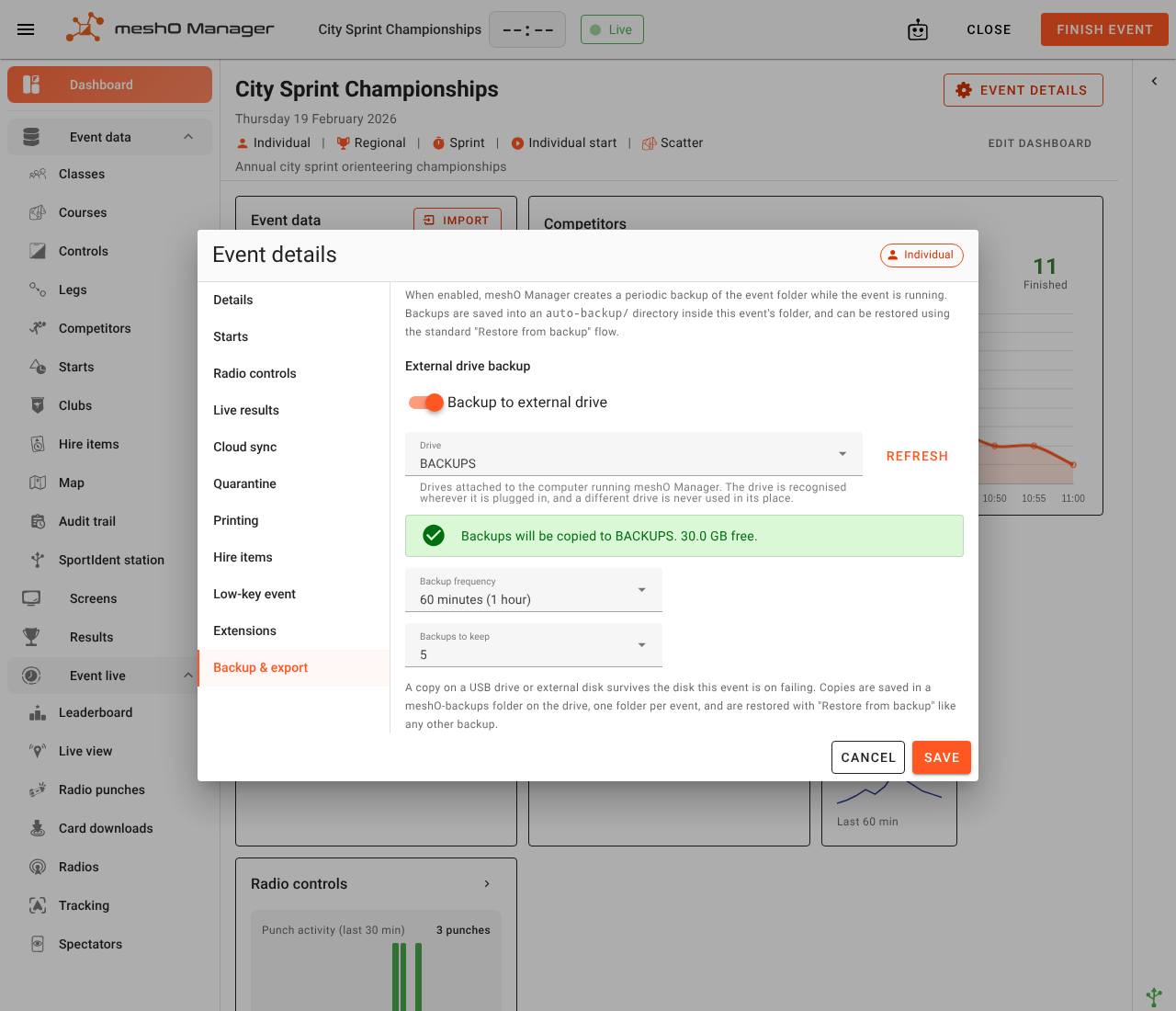
To set it up:
- Plug the drive into the server computer.
- Open the event's Event details and go to the Backup & export tab.
- Under External drive backup, switch on Backup to external drive.
- Choose the drive from the Drive list. Click Refresh if you plugged it in after opening the dialog. The box below the list confirms the choice, for example "Backups will be copied to BACKUPS. 30.0 GB free."
- Set Backup frequency (10, 15, 30, 60 or 120 minutes; the default is 30) and Backups to keep (1, 2, 5, 10 or All; the default is 5).
- Click Save.
The external drive backup is set per event. There is no default for it in Settings, so turn it on for each event that needs it. It has its own schedule, separate from auto backup, because a USB stick is much slower than the server's disk. Taking the local backup every 10 minutes and the external one every hour is a reasonable split.
Copies land in a meshO-backups folder on the drive, with one folder per event (meshO-backups/<event id>/). Anything else on the drive is left alone.
Manager recognises the drive itself, not the slot it's plugged into. If you unplug the stick and plug it into a different USB port, Manager finds it there. A different stick in the old port is never written to instead. That's why a drive with no name or ID can't be chosen: give it a name (a volume label) and click Refresh.
A problem is never silent. If a copy is due and the drive is unplugged, full or write-protected, Manager raises an alert that says which. The alert disappears on its own once copies resume. The same alert appears if the switch is on but no drive has been chosen.
The backup is built on the server's own disk first and only then copied to the drive. A slow stick therefore never holds up card downloads or anything else happening in the live event. If the drive is pulled out halfway through a copy, it never holds a half-written backup that looks complete; the leftover part-file is cleared away by the next copy.
Tip: Take the stick home at the end of the day, or hand it to someone who isn't leaving with the server laptop. A backup in the same bag as the laptop doesn't help if the bag goes missing.
When to back up
Auto backup covers the live event. Take a manual backup as well:
- Before a risky change: a re-import of entries or courses, a bulk edit, any Delete all, letting an AI assistant make changes. None of these can be undone, and a backup taken just before is the undo.
- At the end of setup, before you click Start event. Auto backup doesn't run until the event is live.
- After you finish the event, once results are final. Keep this one somewhere other than the server: it's the copy you'll want in six months' time.
- Before moving the event to another computer (see Moving an event to another computer).
Where backups are kept
Manager keeps everything in its data folder on the server computer:
| Computer | Data folder |
|---|---|
| Windows | C:\Users\Public\Documents\meshO Manager |
| macOS | ~/Library/Application Support/meshO Manager |
| Linux | ~/.local/share/meshO Manager |
Inside it:
| Backup | Location |
|---|---|
| Manual backups saved on the server | Backups/ |
| Auto backups | Events/<event id>/auto-backup/ |
| Card-download files (always kept, one per read) | Events/<event id>/CardDownloads/ |
| External drive backups | meshO-backups/<event id>/ on the drive, not in the data folder |
| Manual backups you downloaded | Wherever your browser saves downloads, on the device you used |
Restoring an event
Restoring always creates a new event. It never overwrites or merges into an event you already have. The restored event:
- keeps the original event's date and gets the next free number on that date (for example, a backup of
2026-02-19.01restores as2026-02-19.02); - is named when you restore it (see below). If the backup was made on this computer, the name offered has (restored) added, so you can tell the copy from the original beside it. If it came from another computer, the name is offered unchanged;
- isn't connected to the original's cloud copy. To show it to spectators online, publish it with Push to cloud on its event card. It is published as a new event, not as an update to the original's copy (see Settings → Cloud sync).
To restore:
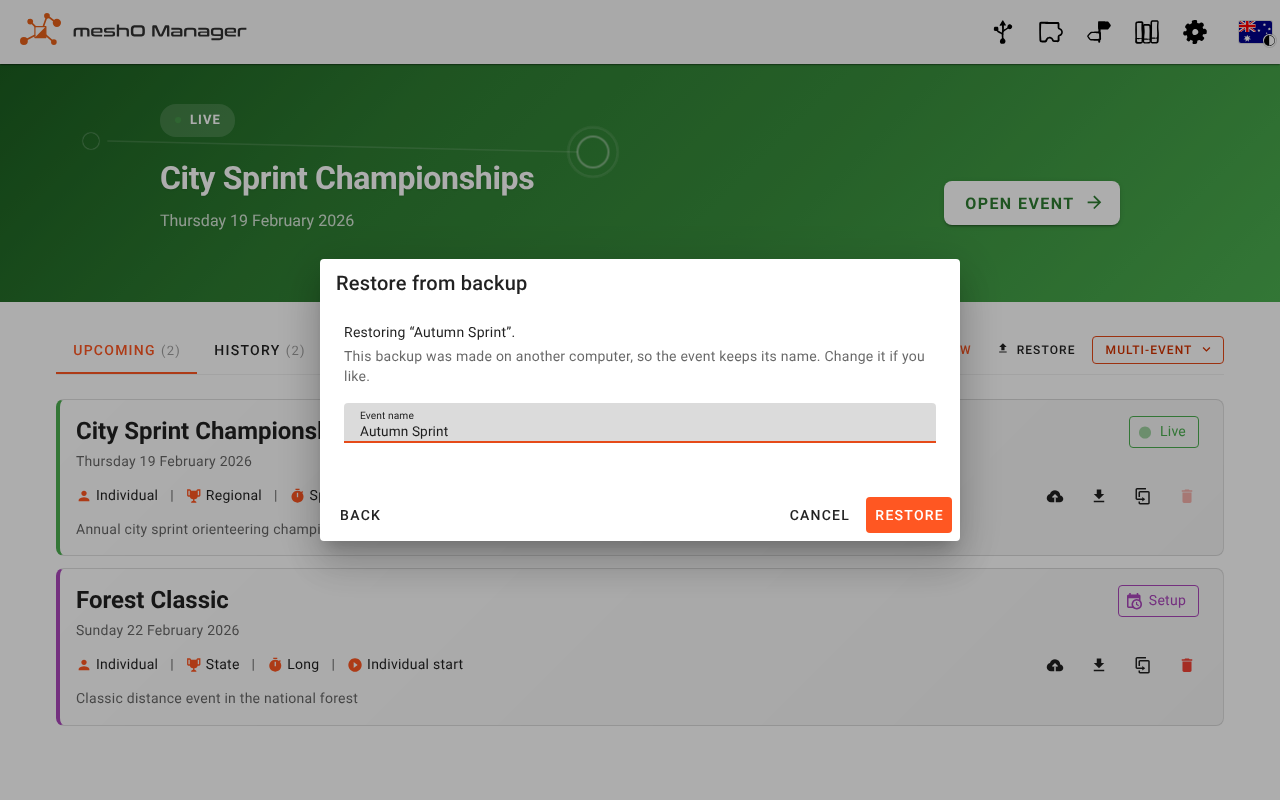
Open the Events list and click Restore (next to New). On a fresh installation with no events yet, the button is Restore from backup, under New event.
Choose where the backup is:
- Local file — click the button and pick a
.zipfrom the device you're using. Use this for a backup you downloaded, an auto backup, or a backup from an external drive. - From server — pick from the backups saved with Save on server.
- Local file — click the button and pick a
Check the Event name. The box explains the name it offers:
- made on this computer: the original name with (restored) added;
- made on another computer: the original name unchanged;
- a backup from an older version of Manager that doesn't record where it was made: (restored) added, in case the original is also on this computer.
Change it if you like (at least 3 characters), then click Restore. Back returns to choosing a backup.
The restored event opens.
Note: Local file means local to the device your browser is on, which may not be the server. To restore an auto backup or an external drive backup from another laptop, copy the zip to that laptop first, or restore from a browser on the server itself.
If the backup was taken while the event was live
An auto backup, an external drive backup, or a manual backup taken during the race is a picture of an event that was still running. When you restore it, the restored event shows as interrupted. From its dashboard you can Resume event, to carry on timing in it, or Mark finished. See the dashboard.
Backups from other versions
A backup taken by an older version of Manager restores in a newer one; the event is upgraded when it's opened. Going the other way is not safe. If a newer version changed the backup file's format, an older one refuses the file outright; if only the event data changed, the older one restores it but may not understand everything in it. Either way, update Manager on the computer you're restoring to first.
Moving an event to another computer
Handing a set-up event to the person running it, or moving it to the laptop that goes to the event, is a backup and a restore plus a short checklist: checking the name, liveresultat and backups, and setting up the printers and hire cards that belong to the laptop. See Moving an event to another computer.
When an event can't be saved
Sometimes the server's disk stops accepting the event's changes. The folder may have become read-only, sync software such as OneDrive or Dropbox may have locked a file, antivirus may be blocking Manager, the disk may be full, or the event folder may have been moved, renamed or deleted (or the drive it's on disconnected). Manager then covers every manager screen with This event can't be saved:
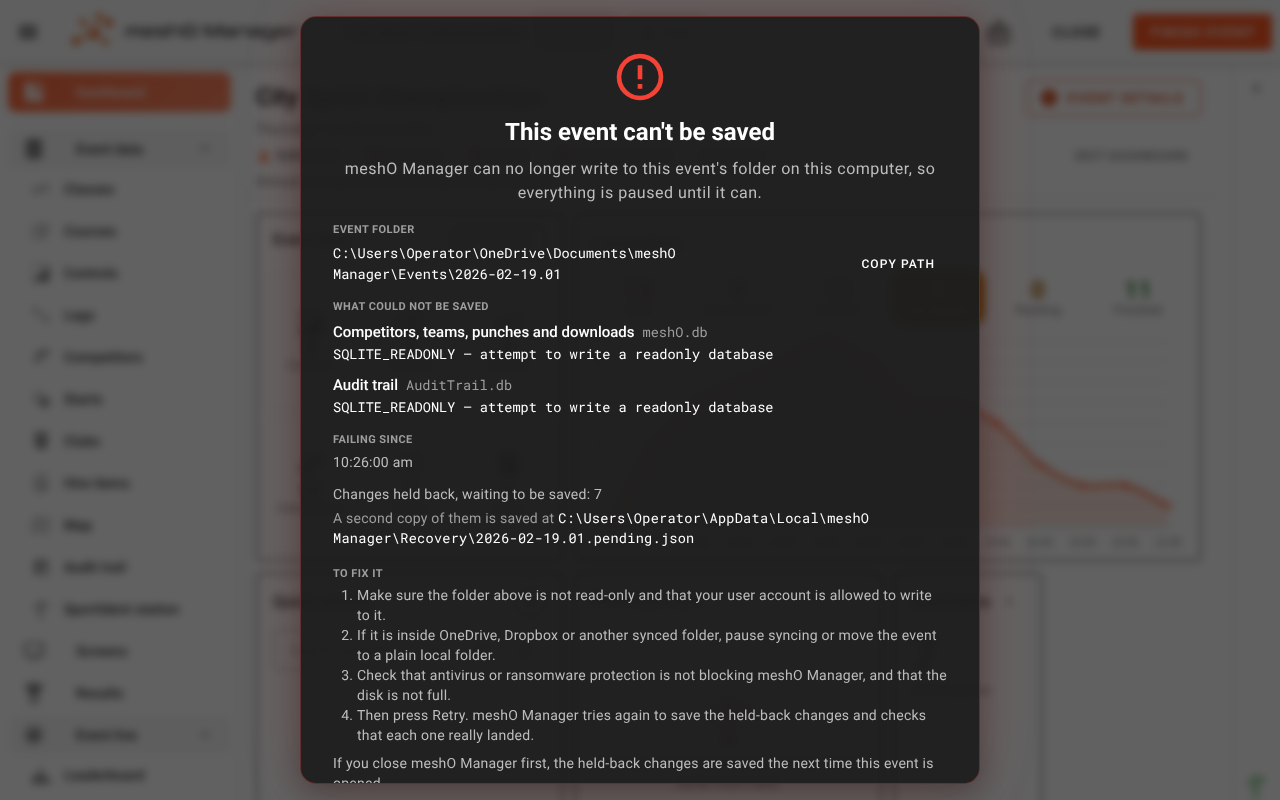
No change is lost while this is showing. Manager holds every change it couldn't save, in order. Card downloads and radio punches keep being taken in. Manager also keeps a second copy of the held-back changes outside the event folder; the message shows where.
To clear it:
- Fix the cause. The message shows the Event folder (with Copy path), What could not be saved — Competitors, teams, punches and downloads, the Audit trail, or an Event file — with the error and Failing since, and the usual fixes:
- make sure the event folder isn't read-only and your user account can write to it;
- if the folder is inside OneDrive, Dropbox or another synced folder, pause syncing or move Manager's data to a plain local folder;
- check antivirus or ransomware protection isn't blocking meshO Manager, and that the disk isn't full.
- Click Retry. Manager saves the held-back changes and checks that each one really landed. The message only goes away once they have; until then it says Still can't save and counts the attempts.
If you have to close Manager before it's fixed, the held-back changes aren't lost. They're saved the next time the event is opened. However, if the message says the second copy couldn't be saved either, keep Manager open until the problem is fixed. In that case the only copy of those changes is in memory.
Warning: If the message says the database's integrity check failed, Retry won't fix it. Keep Manager open and contact meshO support.
The message only appears on the manager screens. The entry desk (/rego) doesn't show it, but changes made there are held in the same way.
Repairing a damaged event
Manager has no repair tool that edits a damaged event in place. Recovery means going back to a good copy and replaying what came after it:
- Restore the most recent backup — usually the newest auto backup or external drive backup. It comes back as a new event, so the damaged one is still there to look at.
- Bring back missing card downloads. Every card read is kept as its own file in the event's
CardDownloadsfolder, written before the download was processed (see Card downloads are always kept twice). On Card downloads, Import from backup finds any files the event hasn't loaded and lets you bring them back in. See Card download. - Re-read the SportIdent stations. Each station's backup memory holds the punches it recorded, independently of Manager. See Station memory.
- Check the audit trail of the restored event against what you remember doing. Changes made after the backup was taken need making again.
If an event won't open at all, restore it from a backup rather than spending race-day time trying to repair it. Keep the broken event's folder (don't delete it) so meshO support can look at it afterwards.
Related
- End-of-event checklist
- Settings
- Troubleshooting
- The dashboard — resuming an interrupted event
- Card download — Import from backup
- Installing meshO Manager
- Live standby — a second computer holding a live copy
- Audit trail